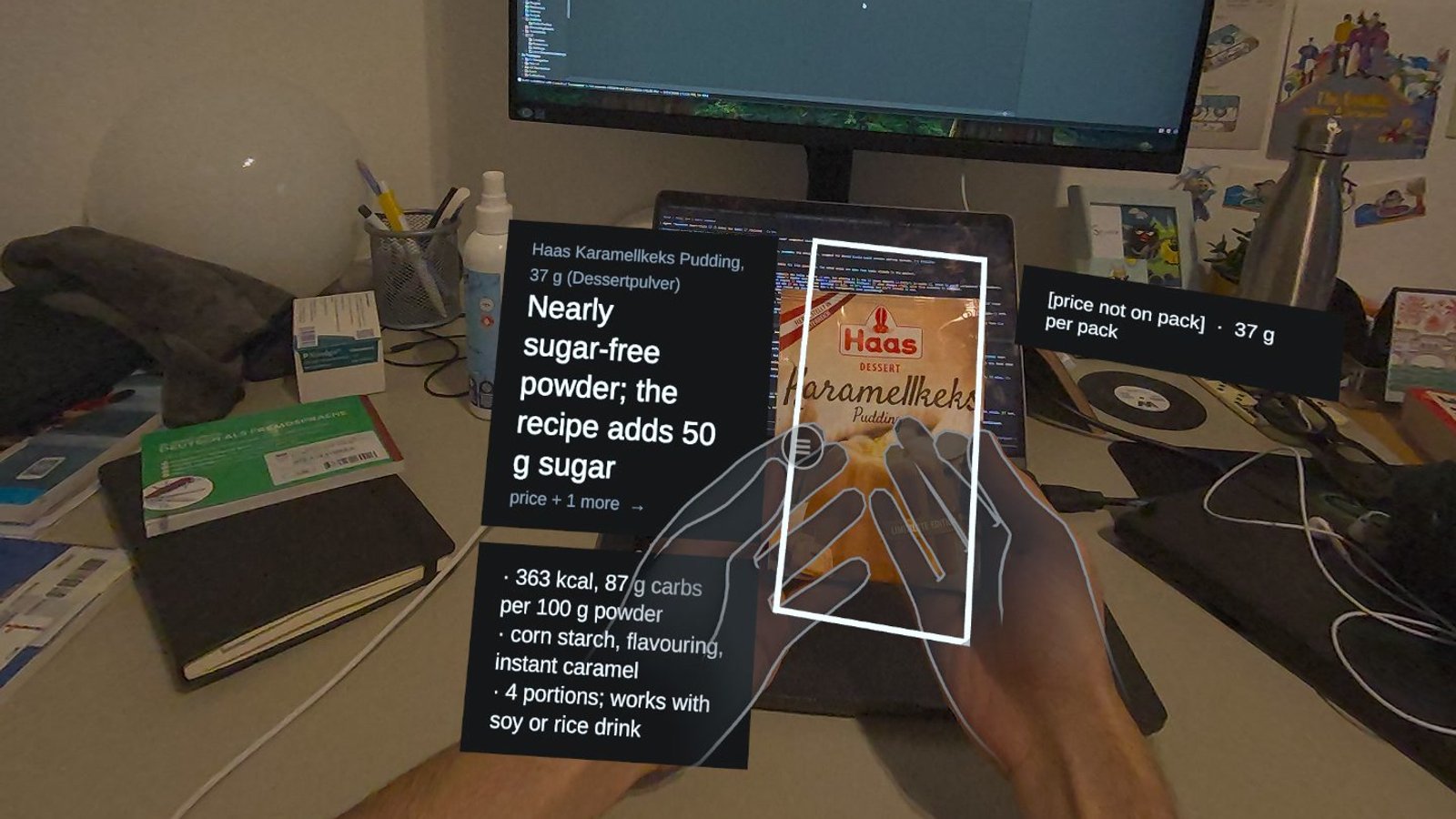
A product-information assistant on your face has to answer two questions before it can show anything: which product are you holding, and where is it? This post is about how the prototype answers them, and the many ways it first did not.
The setup
The prototype runs on a Meta Quest 3 in video passthrough, built in Unity with Meta's XR SDK. I built it with AI coding agents. Claude Code drove the Unity editor through a bridge that ships with Meta's SDK: it compiled the project, built the app, installed it on the headset, read the logs and looked at screenshots from inside the headset. I tested every build with the headset on and decided what was good enough. For a while a second agent, Codex, worked on a different approach on its own branch, so neither could overwrite the other.
The split of roles was clear from the start. In my words during one session: "I'm just a UX person. I know what practically could work but you're the engineer".
Codes, then object detection
Reading the code on the package was the obvious way to identify a product. The headset's camera could not resolve such small print at a natural holding distance.
Next came object detection, a model trained to recognise everyday objects. It found bottles, books and cups. But it knew only the kind of object, never which product; some packages matched no category at all; and it picked up things I was only looking at, like a bottle on the desk while I typed.
The turning point was one sentence of mine: "I don't need it to detect the fact that it's a bottle it's a book. I just need a shape detection."
Finding a shape
The prototype now looks for a shape instead of a category. The headset's depth sensor measures how far away each point in view is, and hand tracking says where your fingers are. The product is the surface that touches your fingers at the same depth. The prototype fits a rectangle to it and places the information beside it.
Depth data is noisy, so the prototype assumes before it measures: it places a box where a product held in that grip would be, then lets the depth data refine it. As I put it during testing: "sometimes assumptions also can give us a space to play".
Learning from failures
The fastest progress came from looking at failures properly. I asked for screenshots from one eye instead of the doubled two-eye view, and for real depth images with the algorithm's decisions drawn on top: green for the product, red for the background. I labelled every failing photo by its timestamp, so each failure could be traced to a moment and a build.
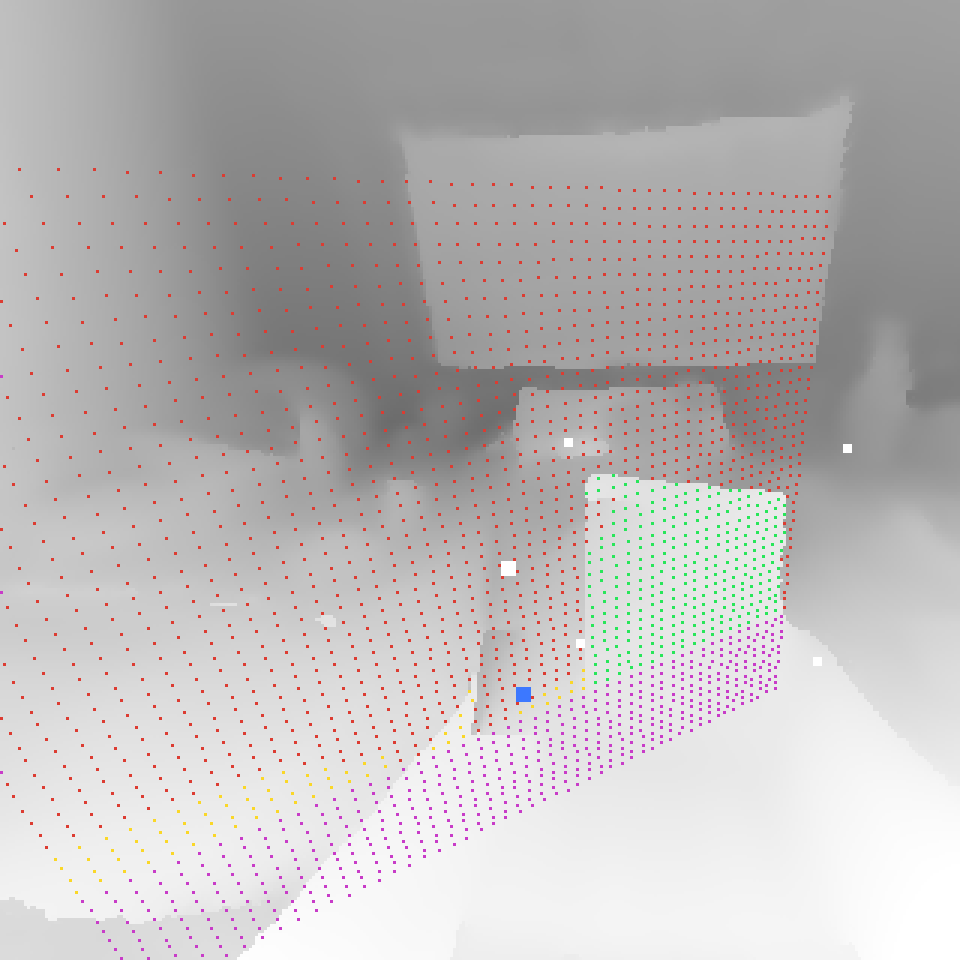
What those images showed:
- The headset's built-in hand removal had no effect in this setup, so my own forearm was found as "the product". The prototype now removes the hands and forearms itself, using the tracked hand joints.
- A hand gripping a product can look like a pinch. Pinches from a hand that is holding something are now ignored.
- People hold products tilted and by their lower end, and the information has to stay still while they read. The rectangle is kept upright, and the information boards turn to face you once and then stay in place.
- A "smarter" version that kept refining the shape all the time made things worse: it accepted fragments and nearby surfaces. The fix was to go back to a few simple checks, which I described as: "it should keep asking the question is rectangle, matches the hand location, and whatever is held in the hand".
A heavier model was not the answer
In parallel, the second agent tried a large vision model running on a laptop connected to the headset by cable. It needed a second or two to find an object and often lost it again. I judged it slower and worse than the simple depth approach. More model did not mean more useful.
Where the information goes
Placement got its own test bench: twelve variants of position, size and distance around the held product. Text is sized by visual angle, so it reads the same at any distance. The cards are fully opaque, because any transparency lets the camera image show through the text. For the card design I looked at running web-style interfaces inside Unity, and chose Unity's own text rendering with Meta's interface kit instead, because a study build has to be stable first.
Cardboard products
Testing with real packages showed a problem the study could not ignore. Through the passthrough cameras, the small print on a real label is hard to read, while the assistant's cards are sharp. My first idea was to "produce cardboard products size of A4, so it's readable". The study now uses three-dimensional cardboard boxes carrying the information of real products, printed at a size chosen by a legibility test through the headset.
Where it stands
The three versions run in one loop, so they share the same rendering and the same gestures by construction. The study is now in its pilot phase, which turns the prototype into a study instrument:
- a session log that records every event on one clock,
- a testing app for running the sessions,
- the cardboard boxes, their print-size test and their information cards,
- a measurement of how well the shape lock works, with known box sizes and false locks counted,
- a technical pilot, to check that each version behaves as specified and responds equally fast,
- a procedural pilot, to check the session as a participant experiences it.
After both pilots, the protocol is frozen and pre-registered, and the main study begins. Then come the analysis and the write-up.
The prototype taught me the same lesson as the research question. The simple version that does one thing reliably is worth more than the clever one that does everything some of the time.